Best tablets in 2026
We compared eight current tablets on manufacturer specifications and published reviews, and explain how to choose between iPad, Android and Windows options.
RoxMag may earn a commission if you buy through the links on this page, at no extra cost to you. It never changes our picks. How we choose.
This guide to the best tablets is for shoppers deciding which slate fits their budget and their phone. The Apple iPad Pro 11-inch and 13-inch (M5) is our best overall pick. The other picks cover different needs: the Samsung Galaxy Tab A11+ keeps costs low, the Galaxy Tab S11 Ultra suits buyers already inside Samsung's ecosystem, and the Microsoft Surface Pro 13-inch (12th Edition) works as a laptop replacement.
Three details shape a sensible choice. On the iPad Pro (M5), stepping up to 1TB or 2TB storage also brings 16GB of memory and a 10-core CPU, against 12GB and 9 cores on 256GB and 512GB versions, so capacity and speed rise together. Stylus support is model-specific: hover works with the Apple Pencil Pro and USB-C Pencil on iPad Pro and iPad Air, while the standard iPad (A16) pairs with the USB-C Pencil or a first-generation Pencil plus adapter. Samsung pledges seven Android generations and seven years of security patches for the Galaxy Tab S11 series. RoxMag compares manufacturer specifications and published reviews and does not hands-on test.
Our top picks
| # | Pick | Best for |
|---|---|---|
| 1 | Apple iPad Pro 11-inch and 13-inch (M5)Best overall | Creators who want the fastest iPad |
| 2 | Samsung Galaxy Tab S11 UltraBest premium Android tablet | Android users who sketch on a big screen |
| 3 | Apple iPad Air 11-inch and 13-inch (M4)Best for students | Students who need a mid-priced iPad |
| 4 | Lenovo Idea Tab Pro Gen 2Best for drawing and note-taking | Students sketching on a large LCD screen |
| 5 | Samsung Galaxy Tab A11+Best budget | Buyers who want a cheap long-lived tablet |
| 6 | OnePlus OnePlus Pad Go 2Best for reading and media | Reading and streaming on a budget |
| 7 | Microsoft Surface Pro 13-inch (12th Edition)Best 2-in-1 for work | Windows users who need a keyboard tablet |
| 8 | OnePlus OnePlus Pad 3Best value | Buyers who want a big screen for less |
Apple iPad Pro 11-inch and 13-inch (M5)
Best for: Creators who want the fastest iPad
Apple's M5 iPad Pro earns our best overall label because it pairs a tandem OLED panel that runs from 10Hz to 120Hz with the M5 chip and a 16-core Neural Engine. Reviewers call the display bright and vivid and see a big jump in tablet performance. Wi-Fi 7, Bluetooth 6 and faster charging round it out. Buyers should note that 16GB of memory and the 10-core CPU are reserved for the 1TB and 2TB builds.
What we like
- Published reviews describe the OLED screen as bright, vivid and rich in colour, with performance well ahead of earlier tablets.
- Wireless moves to Wi-Fi 7 and Bluetooth 6, and charging is quicker than on the previous generation.
- The 13-inch version weighs 579g on Wi-Fi and offers a 2752 x 2064 panel at 264 ppi for creative work.
Trade-offs
- Reviewers say people who already own the M4 model will struggle to find a reason to upgrade.
- The keyboard and folio add-ons are expensive.
- The 256GB and 512GB configurations ship with 12GB of memory and a 9-core CPU, so the full 16GB and 10-core chip require a 1TB or 2TB model.
Key specifications
| Display | Tandem OLED with ProMotion (10 to 120Hz); 11-inch 2420 x 1668, 13-inch 2752 x 2064, both 264 ppi |
|---|---|
| Chip | Apple M5, 10-core GPU, 16-core Neural Engine |
| Memory | 12GB unified memory on 256GB and 512GB models; 16GB on 1TB and 2TB models |
| Storage | 256GB, 512GB, 1TB or 2TB; nano-texture glass option on 1TB and 2TB models |
| Cellular | Wi-Fi + Cellular models: 5G (sub-6 GHz) and Gigabit LTE, eSIM only |
| Apple Pencil | Apple Pencil Pro and Apple Pencil (USB-C), with hover |
| Wireless | Wi-Fi 7 (802.11be), Bluetooth 6 |
| Battery | Up to 10 hours of web or video on Wi-Fi; up to 9 hours on cellular data |
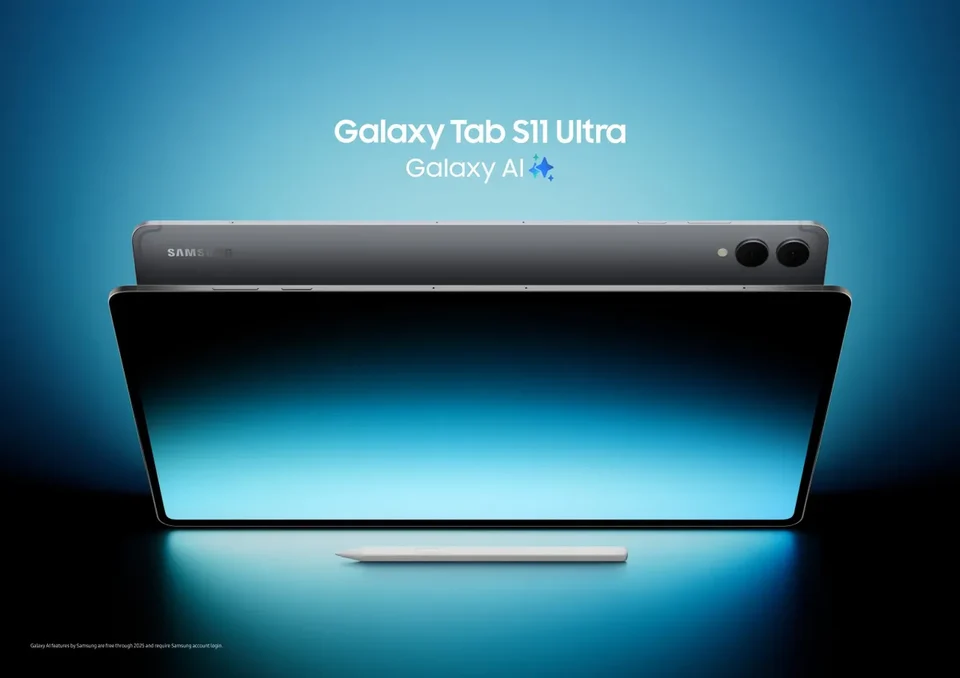
Photo: Samsung, CC0, Wikimedia Commons
Samsung Galaxy Tab S11 Ultra
Best for: Android users who sketch on a big screen
The Galaxy Tab S11 Ultra earns our premium Android pick because it pairs a 14.6-inch Dynamic AMOLED 2X panel with a 120Hz adaptive refresh rate and up to 1600 nits in HDR, a canvas that suits sketching. Reviewers highlight the slim 5.1mm body, bright large OLED, solid performance and lengthy update commitment. Samsung promises seven Android generations plus seven years of security patches. The hexagon-shaped S Pen ships in the box and carries IP68 protection. Battery capacity is 11,600mAh, rated by Samsung for up to 23 hours of video.
What we like
- Reviewers describe a slim chassis, a big bright OLED panel, capable performance and a generous software support window.
- Samsung includes the redesigned S Pen in the box, so sketching works without an extra purchase.
- Samsung lists up to seven Android upgrades and seven years of security updates from global launch.
Trade-offs
- The included stylus omits Bluetooth functions, and the display's PWM flicker rate remains low.
- The screen has no LTPO technology, and reviewers say colour calibration could be tighter.
Key specifications
| Display | 14.6-inch Dynamic AMOLED 2X, 120Hz adaptive refresh, up to 1600 nits HDR peak brightness |
|---|---|
| Processor | 3nm MediaTek chipset |
| Memory | 12GB or 16GB RAM |
| Storage | 256GB, 512GB or 1TB; microSD expansion up to 2TB (card sold separately) |
| S Pen | Redesigned hexagon-shaped S Pen included in the box, IP68-rated |
| Battery | 11,600 mAh, up to 23 hours of video playback (Samsung figure) |
| Software updates | Up to 7 generations of Android OS upgrades and 7 years of security updates from global launch |
| Wireless | Wi-Fi 7 (per Samsung comparison table) |
Apple iPad Air 11-inch and 13-inch (M4)
Best for: Students who need a mid-priced iPad
The iPad Air M4 suits students who want a capable tablet without stepping up to Pro pricing. Apple fits 12GB of unified memory, up from 8GB last generation, and the M4's 8-core CPU and 9-core GPU give it headroom for coursework, while iPadOS 26 makes split-screen multitasking noticeably better. Wi-Fi 7 and Bluetooth 6 keep connections current, and the 11-inch model weighs 464 g. Published reviews flag the LCD panel's lack of a high refresh rate and the absence of Face ID as trade-offs.
What we like
- 12GB of memory, up from 8GB, plus Wi-Fi 7 via Apple's N1 chip
- M4 performance is strong for this tier, and iPadOS 26 improves multitasking
- Two sizes with P3 wide color and True Tone, and the 11-inch starts at 464 g
Trade-offs
- The LCD screen has no high refresh rate, which one reviewer calls dated
- No Face ID, a feature kept for more expensive iPads
- Heavy AI image generation is far slower than on the iPad Pro M5
Key specifications
| Display | Liquid Retina IPS; 11-inch 2360 x 1640 (500 nits), 13-inch 2732 x 2048 (600 nits), both 264 ppi, P3 wide color, True Tone |
|---|---|
| Chip | Apple M4, 8-core CPU, 9-core GPU, 16-core Neural Engine |
| Memory | 12GB unified memory |
| Storage | 128GB, 256GB, 512GB or 1TB |
| Cellular | Wi-Fi + Cellular models: 5G (sub-6 GHz) and Gigabit LTE, eSIM only |
| Apple Pencil | Apple Pencil Pro and Apple Pencil (USB-C), with hover |
| Wireless | Wi-Fi 7 (802.11be), Bluetooth 6 |
| Battery | Up to 10 hours of web or video on Wi-Fi; up to 9 hours on cellular data |
Lenovo Idea Tab Pro Gen 2
Best for: Students sketching on a large LCD screen
The Idea Tab Pro Gen 2 earns its drawing and note-taking label from a 13-inch IPS panel at 3,504 x 2,109 pixels and 120 Hz, which reviewers rate as bigger, brighter and more colour-accurate than the previous model's screen. The Tab Pen Plus is included, and pen support drew praise. A Snapdragon 8s Gen 4 chip reaches upper-tier performance, and the 6.2 mm metal body stays portable for a tablet this size. Buyers should weigh average battery life and roughly four years of updates.
What we like
- Reviewers rate the 13-inch display as larger, brighter and more colour-accurate than the earlier version, with upper-tier chip performance to match.
- Pen support is well regarded, and the tablet adds Wi-Fi 7, a microSD slot and four speakers.
- The 6.2 mm metal chassis and IP52 rating suit a tablet carried between classes.
Trade-offs
- Software updates are listed only up to Android 18, which the review calls a short span of about four years.
- Battery runtimes are described as average for the 10,200 mAh cell.
- The tablet warms up under load, and the 128 GB version uses slower UFS 3.1 storage than the 256 GB model's UFS 4.0.
Key specifications
| Display | 13-inch IPS, 3,504 x 2,109 pixels, 120 Hz (per Notebookcheck spec table) |
|---|---|
| Chip | Qualcomm Snapdragon 8s Gen 4 |
| RAM and storage | 8 GB RAM; 128 or 256 GB storage (UFS 3.1 and UFS 4.0); microSD slot |
| Battery | 10,200 mAh |
| Software | Android, updates listed up to Android 18 |
| Stylus | Lenovo Tab Pen Plus |
| Build | 6.2 mm metal chassis, IP52 |
| Wireless | Wi-Fi 7, Bluetooth 6.0, no cellular variant |
Samsung Galaxy Tab A11+
Best for: Buyers who want a cheap long-lived tablet
The Galaxy Tab A11+ earns our budget pick because Samsung keeps supporting it far longer than most cheap tablets. Security patches are promised through 30 November 2032. Buyers get an 11 inch 1920 x 1200 screen at 90Hz, an octa-core chip, 6GB or 8GB of RAM and 128GB or 256GB of storage that a microSD card can extend to 2TB. A 7,040 mAh cell is quoted for as much as 15 hours of video, and the 477 g body stays portable.
What we like
- Samsung commits to security patches until the end of November 2032, an unusually long support window at this price.
- A microSD slot accepts cards up to 2TB, and Samsung lists a 3.5 mm headphone jack.
- The 7,040 mAh battery is quoted for as much as 15 hours of video playback, with 25W charging.
Trade-offs
- The 11 inch panel is TFT LCD rather than OLED, capped at 90Hz.
- Wireless is limited to dual-band 802.11ac Wi-Fi, USB is 2.0, there is no NFC, and Samsung does not name the chipset.
Key specifications
| Display | 11.0-inch TFT, 1920 x 1200 (WUXGA), 90Hz refresh rate |
|---|---|
| Processor | Octa-core, 2.5 GHz + 2 GHz |
| Memory | 6GB or 8GB RAM depending on model |
| Storage | 128GB (105GB available) or 256GB; microSD up to 2TB |
| Battery | 7,040 mAh typical, up to 15 hours of video playback |
| Charging | 25W Super Fast Charging |
| Software updates | Security updates valid until 30 November 2032 |
| Cameras | 8.0 MP rear (autofocus), 5.0 MP front |
OnePlus OnePlus Pad Go 2
Best for: Reading and streaming on a budget
The Pad Go 2 earns its place here because the screen suits long reading and streaming sessions. Its 12.1-inch 7:5 panel runs at 2800 x 1980 with 284 PPI, reaches 900 nits peak in high brightness mode, covers 98% of DCI-P3 and carries Dolby Vision certification, while the refresh rate shifts between 30Hz and 120Hz. OnePlus rates the 10050mAh cell for as much as 15 hours of video, and 33W SUPERVOOC charging tops it up.
What we like
- Large 7:5 display with sharp 2800 x 1980 resolution, Dolby Vision and refresh rates that adapt up to 120Hz
- Manufacturer figures claim as much as 15 hours of video from the 10050mAh battery, with 33W fast charging
Trade-offs
- The 5G model reaches only a limited set of countries, and the Stylo pen with 4,096 pressure levels costs extra
- OnePlus lists no promised duration of software updates, citing only a 48-month TUV SUD smoothness certification
Key specifications
| Display | 12.1-inch 7:5, 2800 x 1980, 284 PPI, 900 nits HBM peak, 98% DCI-P3, Dolby Vision support |
|---|---|
| Refresh rate | Adaptive 30, 60, 90 or 120Hz |
| Processor | MediaTek Dimensity 7300-Ultra octa-core |
| Battery | 10050mAh typical (9800mAh rated); up to 15 hours of video playback |
| Charging | 33W SUPERVOOC fast charging; reverse cable charging up to 6.5W |
| Software | OxygenOS 16 |
| Cellular | Wi-Fi and Wi-Fi + 5G variants; 5G offered only in a limited number of countries |
| Stylus | OnePlus Pad Go 2 Stylo with 4,096 pressure levels, sold separately |
Microsoft Surface Pro 13-inch (12th Edition)
Best for: Windows users who need a keyboard tablet
The Surface Pro 13-inch (12th Edition) earns our 2-in-1 for work label because it pairs a 13-inch 120Hz PixelSense touchscreen (2880 x 1920) with Snapdragon X2 Plus or X2 Elite chips and a Hexagon NPU rated up to 80 TOPS. A September 2026 review praised the aluminium build, bright sharp display and steady everyday speed, and called the keyboard, touchpad and pen strong. Microsoft rates up to 15.5 hours of local video, though one reviewer's brightness-maxed loop ran 7.15 hours.
What we like
- Reviewers rate the aluminium chassis and 120Hz screen as bright, sharp and premium, with dependable everyday performance.
- The keyboard, touchpad and pen drew praise, and the speakers are considered good for a tablet.
- Snapdragon X2 Plus or Elite silicon with a Hexagon NPU up to 80 TOPS suits Windows productivity work.
Trade-offs
- The reviewer judged it a weak choice for gaming.
- There is no microSD slot and no USB-A port.
- A looped-video test at maximum brightness reached 7.15 hours, well under Microsoft's 15.5-hour local video figure (test conditions differ).
Key specifications
| Display | 13-inch PixelSense touchscreen, OLED or LCD, 2880 x 1920, 120Hz, HDR support |
|---|---|
| Processor | Snapdragon X2 Plus (10-core) or Snapdragon X2 Elite (12-core) |
| Memory | Up to 64 GB LPDDR5x (figure given for the Surface Pro line) |
| Storage | Up to 1 TB (figure given for the Surface Pro line) |
| NPU | Qualcomm Hexagon NPU, up to 80 TOPS |
| Battery | Up to 15.5 hours local video playback; up to 11.5 hours web browsing (Microsoft figures) |
| Weight | 1.97 lbs (895 g), excluding keyboard |
| Ports | 2 x USB-C / USB4, Surface Connect |
OnePlus OnePlus Pad 3
Best for: Buyers who want a big screen for less
The OnePlus Pad 3 earns its Best value label by pairing a 13.2-inch 3.4K panel at 144Hz with the Snapdragon 8 Elite, a combination reviewers say delivers strong performance for the money. The 12,140 mAh battery is rated by OnePlus for up to 18 hours of video, and 80W charging tops it up quickly. Reviewers cited by Notebookcheck rate it well against iPad Air and Galaxy Tab alternatives, helped by a 5.97 mm metal unibody.
What we like
- Reviewers highlight the big 144Hz screen, Snapdragon 8 Elite speed and lasting battery with fast charging.
- A slim metal unibody and pricing that compares well with iPad Air and Galaxy Tab rivals.
- Eight speakers split between bass units and tweeters support the Dolby Vision certified display.
Trade-offs
- The LCD panel trails OLED on black levels and contrast.
- No cellular version is offered.
- Three Android version upgrades and security patches to 2031 fall short of the longest commitments.
Key specifications
| Display | 13.2-inch 3.4K, 315 PPI, 144Hz (compatible apps only), 900 nits peak, DCI-P3, Dolby Vision HDR certified |
|---|---|
| Chipset | Snapdragon 8 Elite Mobile Platform |
| Battery | About 12,140 mAh typical; up to 18 hours of video playback (OnePlus tests) |
| Charging | Up to 80W SUPERVOOC with official adapters |
| Stylus | OnePlus Stylo 2, sold separately |
| Audio | Eight speakers (four bass units and four tweeters) |
| Build | Metal unibody, 5.97 mm thick |
| Software | Android with Google Gemini |
Best tablets for students and everyday use
Students who need notes, reading and web access on a budget have two strong routes in 2026. The Apple iPad Air (M4) is our pick for the best tablet for students: 12GB of unified memory, up from 8GB, plus an 8-core CPU and 9-core GPU give it room for coursework, and iPadOS 26 makes split-screen work noticeably better. The 11-inch model weighs 464 g and starts at 128GB. Published reviews note the LCD panel lacks a high refresh rate and there is no Face ID. The Lenovo Idea Tab Pro Gen 2 is the drawing and note-taking alternative, with a 13-inch 3,504 x 2,109 IPS screen at 120 Hz, the Tab Pen Plus included, a Snapdragon 8s Gen 4 and a microSD slot. Reviewers call its battery life average and its update window roughly four years.
For the best tablet for school, weigh what each machine asks of you over a term. The iPad Air offers 128GB to 1TB, Wi-Fi 7 and Bluetooth 6, and up to 10 hours of web or video on Wi-Fi, dropping to 9 hours on cellular; cellular iPads are eSIM only, with no physical SIM tray. Apple Pencil Pro and the USB-C Pencil both work, with hover. The Idea Tab Pro Gen 2 pairs 8GB RAM with 128GB or 256GB storage, and the 128GB version uses slower UFS 3.1 memory than the 256GB model's UFS 4.0. Its 10,200 mAh cell and 6.2 mm metal body suit a bag carried between classes.
How much storage does a student tablet need?
Start at 128GB and move up only if you keep video, large PDFs or big app libraries offline. Both picks begin there: the iPad Air runs from 128GB to 1TB, and the Idea Tab Pro Gen 2 comes in 128GB or 256GB. On the Lenovo, the 128GB model uses UFS 3.1 storage while the 256GB version uses faster UFS 4.0, so the larger tier buys speed as well as space. The Idea Tab Pro Gen 2 also has a microSD slot, which lets you add capacity later instead of paying upfront.
Is an iPad better than an Android tablet for school?
There is no single answer, because the two platforms trade strengths. The iPad Air (M4) brings 12GB of memory, the M4 chip, Wi-Fi 7 and a choice of Apple Pencil Pro or the USB-C Pencil with hover, and reviews flag the LCD's lack of a high refresh rate and the missing Face ID as compromises. The Idea Tab Pro Gen 2 counters with a 120 Hz 13-inch display, an included Tab Pen Plus and a microSD slot, but its updates are listed only to Android 18, about four years. Pick the iPad for longer software support and pen ecosystem, the Lenovo for screen size and included stylus.
Best tablets for drawing and note-taking
If you want the best tablet for drawing, start with the panel and the pen that ships with it. The Apple iPad Pro 11-inch and 13-inch (M5) pairs a tandem OLED screen running from 10Hz to 120Hz with support for Apple Pencil Pro and the USB-C Pencil, hover included, so the cursor appears before the tip lands. The 13-inch model measures 2752 x 2064 at 264 ppi and weighs 579g on Wi-Fi. Note that memory and CPU scale with storage: 256GB and 512GB builds carry 12GB of RAM and a 9-core processor, while 1TB and 2TB builds step up to 16GB and 10 cores.
For the best tablet with stylus included, the Samsung Galaxy Tab S11 Ultra puts a redesigned hexagon-shaped S Pen in the box, rated IP68, alongside a 14.6-inch Dynamic AMOLED 2X panel at 120Hz adaptive refresh and up to 1600 nits in HDR. The Lenovo Idea Tab Pro Gen 2 takes our drawing and note-taking label: a 13-inch IPS screen at 3,504 x 2,109 pixels and 120Hz, the Tab Pen Plus bundled, a Snapdragon 8s Gen 4 chip and a 6.2mm metal body. Its updates stop at Android 18, roughly four years, and the 128GB version uses slower UFS 3.1 storage.
Does the stylus come in the box?
It depends on the brand. Samsung bundles the S Pen with the Galaxy Tab S11 Ultra, so sketching and handwriting work without spending more. Lenovo includes the Tab Pen Plus with the Idea Tab Pro Gen 2, and reviewers rate pen support well. Apple sells the Pencil separately, and which model fits varies: the iPad Pro and iPad Air take the Pro Pencil or the USB-C Pencil, both with hover, whereas the standard iPad (A16) accepts the USB-C Pencil or the first-generation Pencil through an adapter. On the Surface Pro, the Slim Pen and keyboards are separate purchases.
Best budget tablets
Shoppers after a simple slate for streaming shows and long reading sessions should start with the Samsung Galaxy Tab A11+. Its 11 inch TFT panel runs at 1920 x 1200 with a 90Hz refresh rate, the octa-core processor is paired with 6GB or 8GB of RAM, and storage lands at 128GB or 256GB before a microSD card adds as much as 2TB. Samsung quotes the 7,040 mAh battery for up to 15 hours of video, 25W charging refills it, and the 477 g frame is easy to hold. The OnePlus Pad Go 2 suits readers who want a bigger canvas: a 12.1 inch 7:5 panel at 2800 x 1980 with 284 PPI, 98% DCI-P3 coverage, Dolby Vision and a refresh rate that moves between 30Hz and 120Hz.
Neither pick is a performance machine, and that is the trade for the price. The Tab A11+ stays on dual-band 802.11ac Wi-Fi, USB 2.0 and no NFC, and Samsung does not name the chipset. The Pad Go 2 asks extra for the Stylo pen with 4,096 pressure levels, and its 5G variant reaches only a handful of countries. For media and reading, though, both cover the basics well: the OnePlus model draws on a 10050mAh cell rated for as much as 15 hours of video and 33W SUPERVOOC charging, while the Samsung tablet keeps a 3.5 mm headphone jack that many buyers still want.
What do budget tablets give up?
The savings usually show up in the panel, the wireless radio and the accessories. The Galaxy Tab A11+ uses a TFT LCD capped at 90Hz rather than an OLED, connects over dual-band 802.11ac Wi-Fi only, and relies on USB 2.0 with no NFC. The OnePlus Pad Go 2 sells its Stylo pen separately, and the 5G version is offered in a limited set of countries. Neither maker publishes a named chipset for these models, so buyers cannot compare silicon the way they can on premium slates.
How long do budget tablets get software updates?
Support varies sharply, so check the promise before buying. Samsung lists security updates for the Galaxy Tab A11+ as valid until 30 November 2032, a window that few cheap tablets match and one confirmed on its UK product page. OnePlus gives no stated duration for the Pad Go 2, pointing only to a 48-month TUV SUD smoothness certification, which covers performance rather than patches. For context, Google sets a floor of five years of security fixes for the Pixel Tablet from its first US Google Store sale, and a June 2026 report says that cover now stretches to mid-2028.
Best tablets that can replace a laptop
If you want one device for work and play, the Microsoft Surface Pro 13-inch (12th Edition) is the strongest fit here. It runs Windows on a 13-inch PixelSense touchscreen at 2880 x 1920 and 120Hz, with either an OLED or LCD panel, and pairs a Snapdragon X2 Plus (10 cores) or X2 Elite (12 cores) with a Hexagon NPU rated to 80 TOPS. A September 2026 review liked the aluminium body, the bright, sharp screen and the pen, keyboard and touchpad. Microsoft quotes up to 15.5 hours of local video, though a maximum-brightness loop managed 7.15 hours. The keyboard and Slim Pen cost extra, and there is no USB-A or microSD.
The OnePlus Pad 3 is the value option for the same job. Its 13.2-inch 3.4K screen reaches 144Hz in supported apps, the Snapdragon 8 Elite keeps pace with daily tasks, and the 12,140 mAh cell is rated by OnePlus for as much as 18 hours of video, with 80W charging. Reviewers cited by Notebookcheck rate it against iPad Air and Galaxy Tab rivals, and the metal body is 5.97 mm thin. The LCD cannot match OLED for blacks, there is no cellular model, and software support runs to three Android upgrades with patches until 2031.
Can a tablet really replace a laptop?
For many people, yes, with conditions. A tablet covers a laptop's core work when it has a desktop-class chip, a keyboard and pen, and enough ports. The Surface Pro 13-inch (12th Edition) shows the trade-offs: Windows apps and an 80 TOPS NPU suit productivity, but the keyboard and pen are separate purchases, and the port selection stops at two USB-C/USB4 connections plus Surface Connect. Android alternatives such as the OnePlus Pad 3 handle browsing, notes and media well, yet their upgrade windows are shorter than the longest commitments, so check how long the maker promises updates before you commit.
How we chose
Every tablet in this guide was on sale when we wrote it. Manufacturer pages supply the specifications, and published reviews listed under Sources inform our findings. RoxMag does not hands-on test products. No brand pays for placement. We leave prices out because they shift daily. Our criteria follow what actually differs between models. Storage tiers can change performance: on the iPad Pro (M5), 256GB and 512GB units pair 12GB of memory with a 9-core CPU, while 1TB and 2TB versions step up to 16GB and a 10-core CPU. Display type matters, from the iPad Pro's tandem OLED to the Galaxy Tab S11's 120Hz Dynamic AMOLED 2X and the iPad Air's Liquid Retina IPS LCD. We also weigh stylus support, eSIM-only cellular on iPads, and update commitments such as Samsung's 7 years and Google's Pixel Tablet support.
Frequently asked questions
Which is better, an iPad or an Android tablet?
Neither wins outright; the right pick depends on your apps and stylus needs. Apple splits its range sharply: the iPad Pro (M5) runs a tandem OLED panel and, on 1TB and 2TB models, a 10-core CPU with 16GB of memory, while 256GB and 512GB versions step down to a 9-core CPU and 12GB. Samsung bundles the S Pen with the Galaxy Tab S11 Ultra and pledges seven OS generations plus seven years of security patches.
How long do tablets last?
Support windows now stretch for years, so check the software commitment before buying. Samsung promises the Galaxy Tab S11 series seven Android OS generations and seven years of security fixes from global launch. Google states at least five years of security updates for the Pixel Tablet from its US Store debut, and a June 2026 report says that runs to mid-2028. Samsung's British listing for the Galaxy Tab A11+ shows fixes valid to 30 November 2032.
Do you need cellular on a tablet?
Only if you work away from Wi-Fi often, because cellular costs more and locks you to eSIM. Every cellular iPad, from Pro to Air to the standard model, uses eSIM and takes no physical SIM card. The Lenovo Idea Tab Pro Gen 2 has no cellular version at all, and OnePlus sells the Pad Go 2 with 5G in just a handful of countries. Battery estimates also drop, from 10 hours on Wi-Fi to 9 on cellular for iPad Pro and Air.
What screen size should I choose?
Match the panel to how you carry and use the tablet. The Galaxy Tab S11 Ultra has a 14.6-inch Dynamic AMOLED 2X at 120Hz, OnePlus Pad 3 offers 13.2 inches at 3.4K and 144Hz, and the Surface Pro 13-inch pairs a 2880 x 1920 PixelSense screen at 120Hz with a 895g body. The Galaxy Tab A11+ keeps things portable at 11 inches and 1920 x 1200 at 90Hz.
Are tablets good for kids?
Budget Android slates suit shared family use, provided you check the stylus and storage details. The Galaxy Tab A11+ has an 11-inch 90Hz display, 6GB or 8GB of RAM, 128GB or 256GB of storage and a microSD slot rated to 2TB, with security fixes promised to 30 November 2032. The OnePlus Pad Go 2 Stylo, with 4,096 pressure levels, is bought separately rather than included.
Sources
Specifications come from the manufacturers' own pages. Review findings come from the published reviews below. Products and specifications change, so check the manufacturer page before you buy.
- Apple: iPad Pro tech specs
- Apple: iPad Air tech specs
- Apple: iPad (A16) tech specs
- Apple: Compare iPad models
- Samsung US: Galaxy Tab S11 series
- Samsung US: Galaxy Tab S10 FE and FE+
- Samsung UK: Galaxy Tab A11+ Wi-Fi
- Google Pixel Tablet Help: technical specifications
- OnePlus: OnePlus Pad 3
- OnePlus: OnePlus Pad Go 2
- Microsoft: Surface Pro
- GadgetGuy: iPad Pro (M5, 2025) review
- Engadget: iPad Air M4 review
- TechEBlog: 11th gen iPad A16 review
- SlashGear: iPad (2025) 11th generation review
- Notebookcheck: Samsung Galaxy Tab S11 Ultra
- Notebookcheck: Samsung Galaxy Tab S11 review
- BGR: Is the Pixel Tablet still worth buying
- Notebookcheck: OnePlus Pad 3
- Android Planet: OnePlus Pad 3
- MyNextTablet: Surface Pro 13 (12th Edition) review
- Notebookcheck: Lenovo Idea Tab Pro Gen 2
- apple.com
- apple.com
- lenovo.com