Best mechanical keyboards in 2026
We compared eight current mechanical keyboards on manufacturer specifications and published reviews, and explain switches, layouts and Hall effect in plain English.
RoxMag may earn a commission if you buy through the links on this page, at no extra cost to you. It never changes our picks. How we choose.
Switch feel is the first fork in the road: clicky types such as Blue, Green and White add an audible click and a bump, tactile Brown and Clear switches keep the bump but go quiet, and linear Red and Silver switches glide with neither. Hall effect boards measure key travel with magnets, which allows rapid trigger, adjustable actuation and multiple actions per key, though their software carries much of the weight and analog gamepad-style input is not universal. Rapid trigger resets a key wherever it sits when released, shrinking the gap before the next press. Layout matters too, from 96 percent with a squashed numpad down to 60 percent without arrows or a function row.
This guide to the best mechanical keyboard compares eight picks, from the Asus ROG Strix Scope II 96 Wireless to the Logitech G515 Lightspeed TKL, covering gaming, wireless, competitive FPS, compact, office, Mac and value needs. RoxMag compares specifications and published reviews rather than hands-on testing, so treat each entry as a summary of documented strengths and limits, including hot-swap caveats on Hall effect models.
Our top picks
| # | Pick | Best for |
|---|---|---|
| 1 | Asus ROG Strix Scope II 96 WirelessBest overall | Gamers who also type and want wireless freedom |
| 2 | Razer Huntsman V3 ProBest for gaming | Competitive players who tune actuation per key |
| 3 | Razer BlackWidow V4 Pro 75%Best wireless | Gamers wanting a hot-swappable wireless 75 percent board |
| 4 | Wooting 60HE v2Best for competitive FPS | FPS players chasing the fastest possible input |
| 5 | SteelSeries Apex Pro Mini WirelessBest compact keyboard | Players short on desk space who still want wireless |
| 6 | Das Keyboard 6 ProfessionalBest for office and typing | Office typists who prefer a quiet tactile feel |
| 7 | Logitech MX Mechanical MiniBest for Mac and productivity | Mac users who want a quiet low-profile desk keyboard |
| 8 | Logitech G515 Lightspeed TKLBest value | Budget-minded gamers wanting low-profile wireless |
Asus ROG Strix Scope II 96 Wireless
Best for: Gamers who also type and want wireless freedom
The ROG Strix Scope II 96 Wireless earns our best overall label because it covers gaming and everyday typing without a cable. Tom's Hardware ranks it top of its October 2026 gaming list, citing the hot-swappable switches, an aluminum alloy top plate, double-shot PBT caps and a 1012 g build, plus long battery life. The 96 percent layout keeps every function and number key, and the pre-lubed NX Snow linears measured 45 g actuation at 1.8 mm and felt smooth, stable and quiet.
What we like
- Tom's Hardware's October 2026 list puts it first overall, crediting the swappable switches, aluminum top plate, PBT keycaps and long runtime.
- The lubed NX Snow linear switches registered 45 g actuation force and a 1.8 mm actuation point, and reviewers found them smooth, stable and quiet.
- PC Gamer likes the sound dampening and the multiwheel control.
Trade-offs
- Tom's Hardware finds the 96 percent arrangement cramped and notes only one programmability layer.
- Armoury Crate software drew complaints from both Tom's Hardware and PC Gamer.
- PC Gamer points out it lacks Hall effect switches, so quicker-registering boards exist.
Key specifications
| Layout | 96%: retains all function and number keys in a more compact layout |
|---|---|
| Connectivity | Bluetooth (up to three devices), 2.4 GHz with ROG SpeedNova, or wired USB |
| Battery life (2.4 GHz) | Up to 1500 hours |
| Switches | Hot-swappable, pre-lubed ROG NX Snow linear and ROG NX Storm clicky switches |
| Keycaps | ROG PBT doubleshot or UV-coated ABS (material may vary by region) |
| Dampening | Integrated sound-dampening foam with switch-dampening pads; pre-lubed stabilizers |
| Controls | Multi-function button and multiwheel for media, volume and lighting; F1 to F5 preset as hotkeys for Xbox Game Bar and recording |
| Receiver | ROG Omni Receiver connects to multiple supported devices with a single receiver |
Razer Huntsman V3 Pro
Best for: Competitive players who tune actuation per key
The Huntsman V3 Pro earns our gaming pick because its Razer Analog Optical Switches Gen-2 let competitive players set actuation anywhere from 0.1 to 4.0 mm per key, with Rapid Trigger resetting keys on as little as 0.1 mm of upward travel. TechRadar's September 2026 guide named it the best gaming keyboard, citing deep customization, fast on-board tweaks and sturdy construction. Tom's Hardware called the tenkeyless version a strong rival to the Wooting 60HE, with pleasant typing and a solid build.
What we like
- TechRadar's 2026 keyboard guide ranks it the top gaming keyboard, highlighting how much you can customize and how quickly settings change on the board itself.
- Tom's Hardware's tenkeyless review describes it as a worthy competitor to the Wooting 60HE, with a good typing feel and dependable construction.
- Per-key actuation from 0.1 to 4.0 mm plus Rapid Trigger and optional Snap Tap give competitive players fine control over how each key responds.
Trade-offs
- TechRadar flags the price as high and notes the wrist rest is shallow with a weak magnet.
- Reviewers found the software side lacking: TechRadar describes slightly buggy software, and Tom's Hardware says Synapse remains bulky.
- Tom's Hardware notes that gamepad emulation support varies by game.
Key specifications
| Switches | Razer Analog Optical Switches Gen-2 |
|---|---|
| Actuation range | Adjustable from 0.1 to 4.0 mm |
| Actuation force | 40 g |
| Rapid Trigger | Keys reset with an upward motion as low as 0.1 mm |
| Snap Tap | Prioritizes the latest input between two selected keys; off by default |
| Keycaps | Textured doubleshot PBT |
| Top plate | Brushed aircraft-grade aluminum |
| Controls | Multi-function digital dial plus three media and macro buttons |
Razer BlackWidow V4 Pro 75%
Best for: Gamers wanting a hot-swappable wireless 75 percent board
The BlackWidow V4 Pro 75% earns our wireless label because it pairs a 75 percent hot-swappable layout with Razer HyperSpeed at a true 4000 Hz polling rate, plus Bluetooth 5.1 for three devices. Tom's Guide, which updated its picks in August 2026, ranks it the top gaming mechanical keyboard, citing Snap Tap support, keycaps that feel good, swappable switches and the 2-inch OLED with clickable Command Dial. Its tactile switches respond quickly enough for Snap Tap, and in-game use is the highlight. A 4200 mAh battery reaches up to 2100 hours in Power Saving Mode.
What we like
- Tom's Guide's updated August 2026 picks place it first among gaming mechanical keyboards, highlighting Snap Tap, the OLED display, swappable switches and keycaps that feel good.
- The tactile switches respond fast enough to take advantage of Snap Tap, and play performance is called the standout.
- Hot-swap support accepts 3-pin or 5-pin switches, so you can change the feel without buying another board.
Trade-offs
- Tom's Guide describes it as very expensive.
- It arrives with just one switch option, according to Tom's Guide.
Key specifications
| Layout | 75% wireless hot-swappable gaming keyboard |
|---|---|
| Switches | Razer Orange Tactile Switches Gen-3, hot-swappable with 3 or 5-pin switches |
| Connectivity | Razer HyperSpeed wireless with true 4000 Hz polling; Bluetooth 5.1 for up to 3 devices; included Type C cable |
| Display | 2-inch OLED with clickable Razer Command Dial |
| Case | Recycled 5052 aluminum alloy top case, ABS plastic bottom case |
| Mounting | Gasket-mounted white FR4 plate with Poron gaskets and plate foam |
| Keycaps | Textured doubleshot PBT |
| Battery | 4200 mAh; up to 2100 hours with Power Saving Mode |
Wooting 60HE v2
Best for: FPS players chasing the fastest possible input
The Wooting 60HE v2 earns its competitive FPS label through input hardware built for speed. Each Lekker Tikken switch actuates anywhere from 0.1mm to 4.0mm, tuned in 0.1mm steps, and Rapid Trigger is set up in Wootility. True 8kHz polling reports input at 0.125ms intervals. PC Gamer's February 2026 review scored it 93 and named it Wooting's finest gaming board so far, praising the typing feel and the feature-rich, responsive software. A 60% frame keeps the mouse area clear.
What we like
- PC Gamer rated it 93 and called it Wooting's best gaming keyboard yet, with excellent typing feel credited to the Lekker Tikken switches.
- Wootility is described as feature-packed, responsive and easy to use, and buyers can pick a metal case.
- Per-key actuation from 0.1mm to 4.0mm plus Rapid Trigger and 8kHz polling give FPS players fine control over response.
Trade-offs
- Some larger keys, especially the right-side space bar, produce a slight ping.
- It costs more than the earlier 60HE.
- Wired-only connection and a 60% layout that relies on function layers for some keys mean it is not for everyone.
Key specifications
| Layout | 60% gaming keyboard; split-spacebar or regular option |
|---|---|
| Switches | Lekker Tikken, full 4mm travel range, closed bottom |
| Actuation | Adjustable per key from 0.1 to 4.0 mm with 0.1mm precision |
| Polling rate | True 8kHz polling (0.125ms input speed) |
| Rapid Trigger | Supported, configured in Wootility |
| Case | Solid aluminium or ABS |
| Keycaps | PBT with transparent legends |
| Sound and feel | FR4 switch plate, HD Poron sandwich, friction fit pad, PET film |
SteelSeries Apex Pro Mini Wireless
Best for: Players short on desk space who still want wireless
The Apex Pro Mini Wireless earns our compact pick because it packs adjustable magnetic switches into a 60% layout that frees up desk room, while cutting the cord. Actuation can be set anywhere from 0.1 mm to 4.0 mm in 0.1 mm steps, and Rapid Trigger is supported. Tom's Hardware named it a top mini gaming keyboard, citing the aluminum top plate, PBT keycaps, 543 g weight and roughly 30 hours per charge over 2.4GHz.
What we like
- Tom's Hardware rates it among the best mini gaming keyboards, pointing to the aluminum top plate, double-shot PBT caps and a 543 g build.
- Connections cover 2.4GHz, Bluetooth 5.0 and wired USB-C, and a firmware update widened the actuation range and enabled Rapid Trigger.
- Per-key RGB, custom actuation points and two-in-one binds are handled in SteelSeries Engine.
Trade-offs
- Dual actuation takes practice to use well, according to Tom's Hardware.
- The SteelSeries GG companion app has bugs, and secondary key legends are difficult to read.
- TechRadar now favors the wired Apex Pro Mini Gen 3, so confirm which generation you are ordering.
Key specifications
| Form factor | Adjustable switch gaming keyboard in 60% form factor |
|---|---|
| Switches | OmniPoint 2.0 Adjustable HyperMagnetic Switches |
| Actuation | Tune to the nearest 0.1 mm, from 0.1 mm to 4.0 mm |
| Rapid Trigger | Supported |
| 2-in-1 Action Keys | Two actions on one key depending on press depth |
| Keycaps | Double Shot PBT, fadeproof |
| Top plate | Series 5000 aircraft-grade aluminum alloy |
| Software | SteelSeries Engine: 2-in-1 binds, per-key RGB, custom actuation |
Das Keyboard 6 Professional
Best for: Office typists who prefer a quiet tactile feel
The 6 Professional earns the office and typing label because its Cherry MX Brown switches give a soft tactile response without the noise of clicky alternatives, and PC Gamer's updated guide ranks it the top office mechanical keyboard. The aluminum enclosure drew praise for solid build, and the oversized volume knob plus two built-in USB-C ports suit desk work. Full-time NKRO and a white LED backlight round it out. ABS keycaps and the absence of configuration software are the noted trade-offs.
What we like
- PC Gamer's January 2026 guide ranks it the best mechanical keyboard for office use.
- Reviewers highlight the comfortable MX Brown switches and the sturdy aluminum construction.
- The volume dial and dual USB-C hub ports were called thoughtful additions for everyday desk work.
Trade-offs
- The laser-etched ABS keycaps feel less premium than the rest of the build.
- There is no software for configuring the keyboard.
- It is not aimed at gaming and does little to advance mechanical keyboard design overall.
Key specifications
| Layout | 104 US (also 105 UK, DE and NO) |
|---|---|
| Switches | Cherry MX Brown (soft tactile) or Cherry MX Blue (clicky) |
| Brown actuation | 55 cN (56 gf), pre-travel 0.08 in, total travel 0.16 in |
| Keycaps | Laser etched ABS; standard Cherry MX stem |
| Enclosure | Aluminum enclosure |
| Connectivity | USB-C connector; built-in 2-port USB-C hub |
| Features | Full-time full-NKRO, oversized volume knob, media controls, sleep key, white LED backlight |
| Dimensions | Length 17.5 in, width 5.31 in, height 1.17 in (1.378 in with feet) |
Logitech MX Mechanical Mini
Best for: Mac users who want a quiet low-profile desk keyboard
The MX Mechanical Mini earns the Mac and productivity label because Logitech sells a separate Mac version with a Mac layout, while the standard model also works with macOS. It uses low-profile mechanical switches in Tactile Quiet, Clicky or Linear versions, so you can pick a quieter feel for shared offices. Keys illuminate as your hands near them and adapt to room light. It connects over Bluetooth or the Logi Bolt receiver and switches among three paired devices by button. Logi Options+ configures Fn keys, lighting and app profiles.
What we like
- Three switch options let buyers choose a quieter typing feel for office use
- Pairs with three devices and covers Windows, macOS, ChromeOS, Linux and iPadOS
- The separate Mac edition ships with a Mac layout for users who want native keys
Trade-offs
- The Mac layout is not included on the standard model and requires buying the separate Mac version
- The Mac edition's compatibility is limited to Mac, iOS and iPadOS, unlike the broader list for the standard model
Key specifications
| Layout | Minimalist layout; a full-size MX Mechanical is also offered |
|---|---|
| Switches | Low-profile mechanical, choice of Tactile Quiet, Clicky or Linear |
| Connectivity | Bluetooth and Logi Bolt USB receiver |
| Multi-device | Up to 3 devices at the push of a button |
| Compatibility | Windows, macOS, ChromeOS, Linux, iPadOS |
| Backlighting | Keys light up when hands approach and adjust to ambient light |
| Software | Logi Options+ for Fn keys, lighting effects and app-specific profiles |
| Keycaps | Matte surface with dual color keycaps |
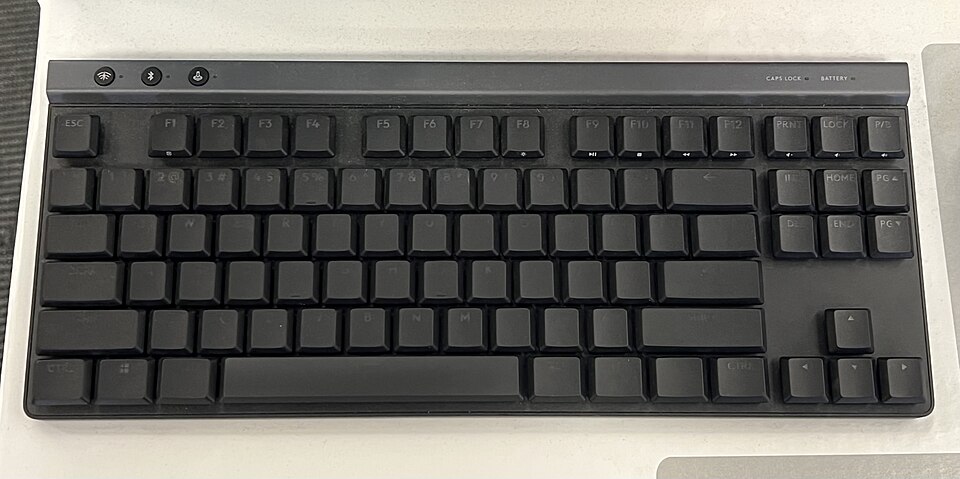
Photo: TaurusEmerald, CC BY-SA 4.0, Wikimedia Commons
Logitech G515 Lightspeed TKL
Best for: Budget-minded gamers wanting low-profile wireless
The G515 Lightspeed TKL earns its Best value label by packing features usually reserved for pricier boards into a slim tenkeyless frame just 22 mm tall. Its low-profile GL mechanical switches, available in tactile or linear, actuate at 1.3 mm, and the double-shot PBT keycaps should resist shine. Tom's Hardware notes bright per-key RGB and a slim plastic body, and reports 36 hours over 2.4GHz at full brightness or up to 600 hours with lighting off. Tri-mode connectivity and 2:1 receiver pairing add flexibility.
What we like
- Bright per-key RGB lighting in a slim all-plastic chassis, as noted by Tom's Hardware
- Long stamina: 36 hours on 2.4GHz at full brightness, or up to 600 hours with the backlight disabled
- Tri-mode connection options plus a single receiver that can pair a compatible mouse alongside the keyboard
Trade-offs
- Tactile feedback is consistent and typing is pleasant, but full-height gaming keyboards feel more satisfying, per Tom's Hardware
Key specifications
| Layout | Tenkeyless, 22 mm height |
|---|---|
| Connectivity | Tri-mode: LIGHTSPEED wireless, Bluetooth, wired data |
| Switches | Low-profile GL mechanical, tactile or linear, 1.3 mm actuation point |
| Keycaps | Low-profile double-shot PBT |
| Construction | Factory-lubed switches and sound dampening layered construction |
| Lighting | LIGHTSYNC RGB |
| Software | G HUB with KEYCONTROL, up to 15 functions per key |
| Pairing | 2:1 pairing of compatible mice on a single USB receiver |
Best mechanical keyboards for gaming
Gamers choosing a board in 2026 face a real fork: conventional mechanical switches or magnetic Hall effect designs. The Razer Huntsman V3 Pro sits on the Hall effect side, with Razer Analog Optical Switches Gen-2 adjustable per key from 0.1 to 4.0 mm at 40 g, and TechRadar's September 2026 guide named it the best gaming keyboard. The Asus ROG Strix Scope II 96 Wireless takes the standard route and still tops Tom's Hardware's October 2026 gaming list, helped by pre-lubed NX Snow linears measuring 45 g at 1.8 mm and up to 1500 hours on 2.4 GHz. The Wooting 60HE v2, scored 93 by PC Gamer in February 2026, shows how far magnetic tuning goes, with 0.1 mm actuation steps and true 8kHz polling.
For wireless play, the Razer BlackWidow V4 Pro 75% pairs HyperSpeed at a true 4000 Hz polling rate with Bluetooth 5.1 for three devices and a 4200 mAh battery rated to 2100 hours in Power Saving Mode; Tom's Guide's August 2026 update put it first among gaming mechanical keyboards. Note that hot-swap freedom differs by type. The BlackWidow accepts 3 or 5-pin switches, while PC Gamer reports few replacements fit the Keychron K2 HE. If you want the best mechanical keyboard for gaming without magnets, the Scope II 96 Wireless is the safer all-round pick.
What is a Hall effect keyboard?
A Hall effect board uses magnets to gauge how far each key travels rather than a metal contact closing. That measurement unlocks rapid trigger, actuation points you set yourself and multiple functions bound to one key. The catch is dependence on software, and not every model delivers full analog, gamepad-style input. The Huntsman V3 Pro illustrates the upside, letting you place actuation anywhere from 0.1 to 4.0 mm per key. The Wooting 60HE v2 goes further with 0.1 mm precision and 8kHz polling. Switch swaps are also restricted: Tom's Hardware found the Arbiter Studio Polar 75 Pro takes only certain magnetic switches.
Is rapid trigger worth it?
Rapid trigger resets a key the moment you release it, wherever it sits in its travel, rather than waiting for a fixed reset point. That shortens the gap between letting go and pressing again, which matters in games where repeated taps decide fights. Whether it justifies the cost depends on how you play. The Huntsman V3 Pro resets on as little as 0.1 mm of upward movement, and the Wooting 60HE v2 configures it in Wootility. Casual players may not notice, and the Huntsman drew criticism over price and buggy software. Standard linear boards like the Scope II 96 Wireless remain cheaper and simpler.
Best wireless mechanical keyboards
A wireless board clears your desk and lets one keyboard serve a laptop, a desktop and a tablet. The Asus ROG Strix Scope II 96 Wireless is our best overall pick for this job: it pairs with three devices over Bluetooth, adds a 2.4 GHz link through ROG SpeedNova, and still accepts a USB cable. Its 96 percent body keeps the number pad and full function row, and the hot-swappable NX Snow linears measured 45 g at 1.8 mm in Tom's Hardware's testing. Battery life runs to 1500 hours on 2.4 GHz. The Razer BlackWidow V4 Pro 75% is the best wireless pick for gaming, with HyperSpeed at a true 4000 Hz polling rate, Bluetooth 5.1 for three devices and a 4200 mAh cell rated for up to 2100 hours in Power Saving Mode.
If desk space matters more than a number pad, the SteelSeries Apex Pro Mini Wireless shrinks to 60 percent and still offers 2.4 GHz, Bluetooth 5.0 and wired USB-C. Its magnetic switches adjust from 0.1 mm to 4.0 mm of travel in 0.1 mm increments, and Rapid Trigger is supported. For Mac users and office typing, the Logitech MX Mechanical Mini comes in a separate Mac edition with a Mac layout, uses low-profile switches in Tactile Quiet, Clicky or Linear versions, and jumps between three paired devices with a button press. It works over Bluetooth or the Logi Bolt receiver.
Is wireless latency a problem for gaming?
Not if you choose the right link. For play, pick 2.4 GHz with polling of at least 1,000 Hz; Bluetooth-only designs are not built for gaming. Rates beyond 1,000 Hz are extremely difficult for anyone, including competitive players, to perceive on a keyboard. The Razer BlackWidow V4 Pro 75% goes further with HyperSpeed at a true 4000 Hz, and Tom's Guide ranks it first among gaming boards, noting its tactile switches respond fast enough for Snap Tap. The Apex Pro Mini Wireless also runs 2.4 GHz, and its Rapid Trigger support means a key begins resetting the moment you let go rather than at a fixed point in its travel, shortening the gap before your next press.
Best compact 60% and 75% keyboards
If desk space is tight, a 60% board removes the number pad, arrow keys, the navigation block and the top function row, leaving only the main typing area. That is the trade most people weigh when hunting for the best 60 percent keyboard, and it is why boards like the Wooting 60HE v2 and the SteelSeries Apex Pro Mini Wireless keep the mouse zone open. The Wooting pairs Lekker Tikken switches with per-key actuation set between 0.1mm and 4.0mm in 0.1mm steps, Rapid Trigger configured in Wootility, and true 8kHz polling that reports every 0.125ms. PC Gamer scored it 93 in February 2026. The SteelSeries version adds 2.4GHz and Bluetooth 5.0 to a wired USB-C option, with OmniPoint 2.0 switches tunable across the same 0.1mm to 4.0mm span.
A 75% layout is the gentler compromise for anyone chasing the best 75 percent keyboard: it keeps the function row and most navigation keys while still shedding the numpad. Both picks here are 60% models, so a 75% buyer should expect a little more width in exchange for fewer function-layer presses. On the wireless side, 2.4GHz with at least 1,000Hz polling is the setting that matters for games, since Bluetooth is not built for that job and rates beyond 1,000Hz are hard for most players to detect. Tom's Hardware measured the Apex Pro Mini Wireless at 543g with about 30 hours per charge over 2.4GHz.
What do you lose on a 60% layout?
A 60% keyboard drops four things at once: the number pad, the separate arrow keys, the navigation cluster and the function row. Those keys are not gone entirely, they move onto function layers, so reaching Delete or an arrow press often means holding a modifier first. That is the real cost of the small footprint, and it is why the Wooting 60HE v2 is described as relying on layers for some keys, which will not suit everyone. A 75% board is the middle ground, keeping the function row and part of the navigation set while still leaving out the numpad.
What does hot-swappable mean?
A hot-swappable board lets you pull a switch and seat a new one without opening the case or desoldering anything. On the Razer BlackWidow V4 Pro 75%, for instance, a supplied puller handles the swap and the sockets accept both 3-pin and 5-pin switches. That makes it easy to move between clicky, tactile and linear feel, or to replace a worn switch. Magnetic Hall effect boards are stricter: PC Gamer notes that few alternatives fit the Keychron K2 HE, and Tom's Hardware found the Arbiter Studio Polar 75 Pro takes only certain other magnetic switches, so check compatibility before buying spares.
Best keyboards for office work and typing
For typists who want a bump they can feel without a click everyone else can hear, the Das Keyboard 6 Professional is the pick to start with. It ships with Cherry MX Brown switches, a soft tactile design with 55 cN actuation, 0.08 in pre-travel and 0.16 in total travel, and PC Gamer's January 2026 guide names it the top office mechanical keyboard. The aluminum enclosure drew praise for solid build, and the oversized volume knob plus two built-in USB-C ports suit desk work. Full-time NKRO and a white LED backlight round it out. The laser-etched ABS keycaps feel less premium than the rest of the build, and there is no configuration software.
If you split time between macOS and Windows, the Logitech MX Mechanical Mini covers more ground. It uses low-profile mechanical switches in Tactile Quiet, Clicky or Linear versions, so a shared office can pick the quieter feel, and keys light up as your hands approach and adjust to ambient light. It pairs with three devices over Bluetooth or the Logi Bolt receiver and covers Windows, macOS, ChromeOS, Linux and iPadOS. Logi Options+ handles Fn keys, lighting and app-specific profiles. Buyers who want native Mac keys must buy the separate Mac edition, which works only with Mac, iOS and iPadOS.
Which switch type is best for typing?
Switch feel splits into three families. Clicky switches such as Blue, Green and White give an audible click plus a bump, tactile switches such as Brown and Clear give the bump without the click, and linear switches such as Red and Silver move smoothly with neither. For typing, the tactile family is the usual recommendation because the bump confirms each keypress without broadcasting it. The Das Keyboard 6 Professional uses Cherry MX Brown, and the MX Mechanical Mini offers a Tactile Quiet option. Clicky switches remain available on the Das Keyboard 6 Professional in Cherry MX Blue if you want the sound.
Are mechanical keyboards too loud for an office?
They can be, but the switch choice decides it. Clicky switches add an audible click on every press, which carries in open-plan rooms, while tactile and linear designs skip that click. The MX Mechanical Mini's Tactile Quiet switches and its low-profile design give a quieter path, and the Das Keyboard 6 Professional's MX Brown switches avoid the click of its own Blue option. If noise is the main concern, pick a tactile or linear board rather than a clicky one, and treat a hot-swappable model as a way to change switches later without desoldering.
How we chose
Every pick here was on sale when this guide was written. Specifications come from each manufacturer's own product pages, and our findings draw on the published reviews listed under Sources. RoxMag does not hands-on test products, so we describe what those sources and the specs show rather than results from our own bench. No brand pays for placement. We leave prices out because they shift daily. In this category the criteria that decide a recommendation are switch feel, which falls into clicky, tactile and linear families, plus layout size from 96 percent down to 60 percent. Hot-swap support matters too, though it is more limited on Hall effect boards, where rapid trigger and adjustable actuation depend heavily on software.
Frequently asked questions
Are mechanical keyboards worth it?
They are worth it if you want control over how each key feels and behaves, because the switch type, layout and firmware all change the typing or gaming experience. Hot-swap models such as the Razer BlackWidow V4 Pro 75% accept 3 or 5-pin switches, so you can swap feel without desoldering. Hall effect boards like the Wooting 60HE v2 add per-key actuation from 0.1 to 4.0 mm and rapid trigger, features membrane boards cannot match. Budget buyers should note that these extras usually raise the price.
What is the difference between linear, tactile and clicky switches?
The three families differ in feedback. Clicky switches such as Blue, Green and White produce a bump plus an audible click. Tactile options like Brown and Clear give the bump alone, with no sound signature. Linear switches, including Red and Silver, travel smoothly with neither bump nor click. The Das Keyboard 6 Professional illustrates the split, shipping with Cherry MX Brown (soft tactile) or Cherry MX Blue (clicky). The Asus ROG Strix Scope II 96 Wireless offers pre-lubed ROG NX Snow linear and ROG NX Storm clicky switches.
How long do mechanical keyboards last?
Published specifications do not give a single lifespan figure, so longevity depends on the parts. Switch makers rate their own mechanisms, and hot-swap designs let you replace a worn switch instead of discarding the board, as on the Razer BlackWidow V4 Pro 75% with its 3 or 5-pin compatibility. Build materials matter too: the Das Keyboard 6 Professional uses an aluminum enclosure, and the Razer Huntsman V3 Pro pairs a brushed aircraft-grade aluminum top plate with textured doubleshot PBT keycaps that resist shine.
Can I use a mechanical keyboard with a Mac?
Yes, some models list macOS support. The Logitech MX Mechanical Mini is rated for macOS alongside Windows, ChromeOS, Linux and iPadOS, connects over Bluetooth or the Logi Bolt receiver, and pairs with up to three devices via a button. Logi Options+ handles Fn keys, lighting effects and app-specific profiles. The Asus ROG Strix Scope II 96 Wireless also offers Bluetooth for as many as three devices plus a 2.4 GHz receiver and USB cable, though its regional keycap material varies.
What is polling rate?
Polling rate is how often a keyboard reports its state to the computer, expressed in hertz. For wireless gaming, choose 2.4 GHz with a minimum of 1,000 Hz; Bluetooth-only boards are not built for play. Going beyond 1,000 Hz brings gains that almost no player, including esports competitors, can detect on a keyboard. The Razer BlackWidow V4 Pro 75% claims true 4000 Hz over HyperSpeed wireless, while the Wooting 60HE v2 states true 8kHz polling, or 0.125 ms input speed.
Sources
Specifications come from the manufacturers' own pages. Review findings come from the published reviews below. Products and specifications change, so check the manufacturer page before you buy.
- Tom's Hardware: Best Gaming Keyboards 2026 (updated 6 Oct 2026)
- PC Gamer: Best gaming keyboards in 2026 (updated 6 Aug 2026)
- PC Gamer: Best mechanical keyboards (updated 16 Jan 2026)
- PC Gamer: Wooting 60HE v2 review (27 Feb 2026)
- TechRadar: The best keyboard in 2026 (updated 24 Sep 2026)
- Tom's Guide: Best mechanical keyboards (updated 14 Aug 2026)
- Tom's Hardware: Razer Huntsman V3 Pro TKL review
- Asus ROG: ROG Strix Scope II 96 Wireless
- Wooting: 60HE v2
- Wooting: 80HE
- Razer: Huntsman V3 Pro
- Razer: BlackWidow V4 Pro 75%
- Corsair: K70 PRO TKL
- Corsair: Galleon 100 SD
- SteelSeries: Apex Pro Mini Wireless
- Logitech G: G515 Lightspeed TKL
- Logitech: MX Mechanical Mini
- Logitech: compare MX Mechanical Mini and Mac version
- Das Keyboard: 6 Professional
- Logitech G: G Pro X TKL Rapid